 1d00e515b9
The main problem is the circular dependency between `session.ts` and `annotations.ts`. To fix it, split the second half of `session.ts` into a separate file, like what is currently done with `project.ts` and `project-implementation.ts`. <!-- Raised an issue to propose your change (https://github.com/cvat-ai/cvat/issues). It helps to avoid duplication of efforts from multiple independent contributors. Discuss your ideas with maintainers to be sure that changes will be approved and merged. Read the [CONTRIBUTION](https://github.com/cvat-ai/cvat/blob/develop/CONTRIBUTING.md) guide. --> <!-- Provide a general summary of your changes in the Title above --> ### Motivation and context <!-- Why is this change required? What problem does it solve? If it fixes an open issue, please link to the issue here. Describe your changes in detail, add screenshots. --> ### How has this been tested? Manual testing. <!-- Please describe in detail how you tested your changes. Include details of your testing environment, and the tests you ran to see how your change affects other areas of the code, etc. --> ### Checklist <!-- Go over all the following points, and put an `x` in all the boxes that apply. If an item isn't applicable by a reason then ~~explicitly strikethrough~~ the whole line. If you don't do that github will show an incorrect process for the pull request. If you're unsure about any of these, don't hesitate to ask. We're here to help! --> - [x] I submit my changes into the `develop` branch - ~~[ ] I have added a description of my changes into [CHANGELOG](https://github.com/cvat-ai/cvat/blob/develop/CHANGELOG.md) file~~ - ~~[ ] I have updated the [documentation]( https://github.com/cvat-ai/cvat/blob/develop/README.md#documentation) accordingly~~ - ~~[ ] I have added tests to cover my changes~~ - ~~[ ] I have linked related issues ([read github docs]( https://help.github.com/en/github/managing-your-work-on-github/linking-a-pull-request-to-an-issue#linking-a-pull-request-to-an-issue-using-a-keyword))~~ - ~~[ ] I have increased versions of npm packages if it is necessary ([cvat-canvas](https://github.com/cvat-ai/cvat/tree/develop/cvat-canvas#versioning), [cvat-core](https://github.com/cvat-ai/cvat/tree/develop/cvat-core#versioning), [cvat-data](https://github.com/cvat-ai/cvat/tree/develop/cvat-data#versioning) and [cvat-ui](https://github.com/cvat-ai/cvat/tree/develop/cvat-ui#versioning))~~ ### License - [x] I submit _my code changes_ under the same [MIT License]( https://github.com/cvat-ai/cvat/blob/develop/LICENSE) that covers the project. Feel free to contact the maintainers if that's a concern. Co-authored-by: Nikita Manovich <nikita@cvat.ai> |
4 years ago | |
|---|---|---|
| .github | 4 years ago | |
| .vscode | 4 years ago | |
| components | 4 years ago | |
| cvat | 4 years ago | |
| cvat-canvas | 4 years ago | |
| cvat-canvas3d | 4 years ago | |
| cvat-cli | 4 years ago | |
| cvat-core | 4 years ago | |
| cvat-data | 4 years ago | |
| cvat-sdk | 4 years ago | |
| cvat-ui | 4 years ago | |
| helm-chart | 4 years ago | |
| serverless | 4 years ago | |
| site | 4 years ago | |
| ssh | 4 years ago | |
| supervisord | 4 years ago | |
| tests | 4 years ago | |
| utils | 4 years ago | |
| .bandit | 4 years ago | |
| .codacy.yml | 6 years ago | |
| .coveragerc | 4 years ago | |
| .dockerignore | 4 years ago | |
| .editorconfig | 7 years ago | |
| .eslintignore | 5 years ago | |
| .eslintrc.js | 4 years ago | |
| .gitattributes | 6 years ago | |
| .gitignore | 4 years ago | |
| .gitmodules | 5 years ago | |
| .nycrc | 5 years ago | |
| .prettierignore | 6 years ago | |
| .prettierrc | 6 years ago | |
| .pylintrc | 4 years ago | |
| .remarkignore | 4 years ago | |
| .remarkrc.js | 5 years ago | |
| .stylelintrc.json | 6 years ago | |
| CHANGELOG.md | 4 years ago | |
| CITATION.cff | 4 years ago | |
| Dockerfile | 4 years ago | |
| Dockerfile.ci | 4 years ago | |
| Dockerfile.ui | 4 years ago | |
| LICENSE | 4 years ago | |
| README.md | 4 years ago | |
| SECURITY.md | 4 years ago | |
| docker-compose.ci.yml | 4 years ago | |
| docker-compose.dev.yml | 4 years ago | |
| docker-compose.https.yml | 4 years ago | |
| docker-compose.yml | 4 years ago | |
| lint-staged.config.js | 4 years ago | |
| manage.py | 4 years ago | |
| mod_wsgi.conf | 4 years ago | |
| package.json | 4 years ago | |
| wait-for-it.sh | 8 years ago | |
| yarn.lock | 4 years ago | |
README.md

Computer Vision Annotation Tool (CVAT)








CVAT is an interactive video and image annotation tool for computer vision. It is used by tens of thousands of users and companies around the world. Our mission is to help developers, companies, and organizations around the world to solve real problems using the Data-centric AI approach.
CVAT is free and open-source.
A new repo: CVAT core team moved the active development of the tool to this new repository.
Start using CVAT online for free: cvat.ai. Or set it up as a self-hosted solution: Self-hosted Installation Guide.
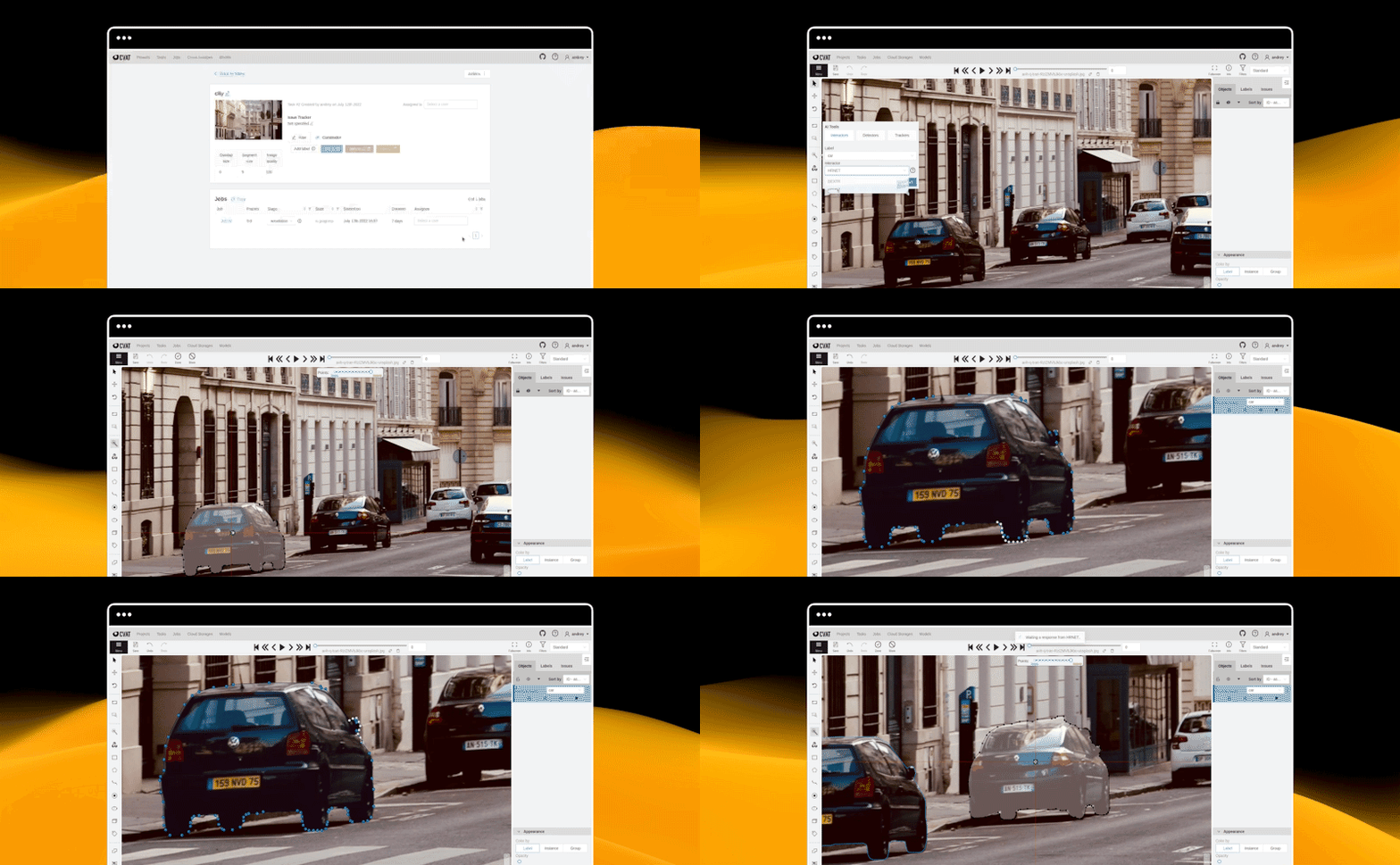
Quick start ⚡
- Installation guide
- Manual
- Contributing
- Datumaro dataset framework
- Server API
- Python SDK
- Command line tool
- XML annotation format
- AWS Deployment Guide
- Frequently asked questions
- Where to ask questions
Partners ❤️
CVAT is used by teams all over the world. In the list, you can find key companies which help us support the product or an essential part of our ecosystem. If you use us, please drop us a line at contact@cvat.ai.
- Human Protocol uses CVAT as a way of adding annotation service to the Human Protocol.
- FiftyOne is an open-source dataset curation and model analysis tool for visualizing, exploring, and improving computer vision datasets and models that are tightly integrated with CVAT for annotation and label refinement.
Public datasets
ATLANTIS, an open-source dataset for semantic segmentation of waterbody images, developed by iWERS group in the Department of Civil and Environmental Engineering at the University of South Carolina is using CVAT.
For developing a semantic segmentation dataset using CVAT, see:
CVAT online: cvat.ai
This is an online version of CVAT. It's free, efficient, and easy to use.
cvat.ai runs the latest version of the tool. You can create up to 10 tasks there and upload up to 500Mb of data to annotate. It will only be visible to you or the people you assign to it.
For now, it does not have analytics features like management and monitoring the data annotation team.
We plan to enhance cvat.ai with new powerful features. Stay tuned!
Prebuilt Docker images 🐳
Prebuilt docker images are the easiest way to start using CVAT locally. They are available on Docker Hub:
The images have been downloaded more than 1M times so far.
Screencasts 🎦
Here are some screencasts showing how to use CVAT.
Computer Vision Annotation Course: we introduce our course series designed to help you annotate data faster and better using CVAT. This course is about CVAT deployment and integrations, it includes presentations and covers the following topics:
- Speeding up your data annotation process: introduction to CVAT and Datumaro. What problems do CVAT and Datumaro solve, and how they can speed up your model training process. Some resources you can use to learn more about how to use them.
- Deployment and use CVAT. Use the app online at app.cvat.ai. A local deployment. A containerized local deployment with Docker Compose (for regular use), and a local cluster deployment with Kubernetes (for enterprise users). A 2-minute tour of the interface, a breakdown of CVAT’s internals, and a demonstration of how to deploy CVAT using Docker Compose.
Product tour: in this course, we show how to use CVAT, and help to get familiar with CVAT functionality and interfaces. This course does not cover integrations and is dedicated solely to CVAT. It covers the following topics:
- Pipeline. In this video, we show how to use app.cvat.ai: how to sign up, upload your data, annotate it, and download it.
For feedback, please see Contact us
API
SDK
- Install with
pip install cvat-sdk - PyPI package homepage
- Documentation
CLI
- Install with
pip install cvat-cli - PyPI package homepage
- Documentation
Supported annotation formats
CVAT supports multiple annotation formats. You can select the format after clicking the Upload annotation and Dump annotation buttons. Datumaro dataset framework allows additional dataset transformations with its command line tool and Python library.
For more information about the supported formats, see: Annotation Formats.
| Annotation format | Import | Export |
|---|---|---|
| CVAT for images | ✔️ | ✔️ |
| CVAT for a video | ✔️ | ✔️ |
| Datumaro | ✔️ | ✔️ |
| PASCAL VOC | ✔️ | ✔️ |
| Segmentation masks from PASCAL VOC | ✔️ | ✔️ |
| YOLO | ✔️ | ✔️ |
| MS COCO Object Detection | ✔️ | ✔️ |
| MS COCO Keypoints Detection | ✔️ | ✔️ |
| TFrecord | ✔️ | ✔️ |
| MOT | ✔️ | ✔️ |
| MOTS PNG | ✔️ | ✔️ |
| LabelMe 3.0 | ✔️ | ✔️ |
| ImageNet | ✔️ | ✔️ |
| CamVid | ✔️ | ✔️ |
| WIDER Face | ✔️ | ✔️ |
| VGGFace2 | ✔️ | ✔️ |
| Market-1501 | ✔️ | ✔️ |
| ICDAR13/15 | ✔️ | ✔️ |
| Open Images V6 | ✔️ | ✔️ |
| Cityscapes | ✔️ | ✔️ |
| KITTI | ✔️ | ✔️ |
| Kitti Raw Format | ✔️ | ✔️ |
| LFW | ✔️ | ✔️ |
| Supervisely Point Cloud Format | ✔️ | ✔️ |
Deep learning serverless functions for automatic labeling
CVAT supports automatic labeling. It can speed up the annotation process up to 10x. Here is a list of the algorithms we support, and the platforms they can be run on:
| Name | Type | Framework | CPU | GPU |
|---|---|---|---|---|
| Deep Extreme Cut | interactor | OpenVINO | ✔️ | |
| Faster RCNN | detector | OpenVINO | ✔️ | |
| Mask RCNN | detector | OpenVINO | ✔️ | |
| YOLO v3 | detector | OpenVINO | ✔️ | |
| Object reidentification | reid | OpenVINO | ✔️ | |
| Semantic segmentation for ADAS | detector | OpenVINO | ✔️ | |
| Text detection v4 | detector | OpenVINO | ✔️ | |
| YOLO v5 | detector | PyTorch | ✔️ | |
| SiamMask | tracker | PyTorch | ✔️ | ✔️ |
| TransT | tracker | PyTorch | ✔️ | ✔️ |
| f-BRS | interactor | PyTorch | ✔️ | |
| HRNet | interactor | PyTorch | ✔️ | |
| Inside-Outside Guidance | interactor | PyTorch | ✔️ | |
| Faster RCNN | detector | TensorFlow | ✔️ | ✔️ |
| Mask RCNN | detector | TensorFlow | ✔️ | ✔️ |
| RetinaNet | detector | PyTorch | ✔️ | ✔️ |
| Face Detection | detector | OpenVINO | ✔️ |
License
The code is released under the MIT License.
This software uses LGPL-licensed libraries from the FFmpeg project. The exact steps on how FFmpeg was configured and compiled can be found in the Dockerfile.
FFmpeg is an open-source framework licensed under LGPL and GPL. See https://www.ffmpeg.org/legal.html. You are solely responsible for determining if your use of FFmpeg requires any additional licenses. CVAT.ai Corporation is not responsible for obtaining any such licenses, nor liable for any licensing fees due in connection with your use of FFmpeg.
Contact us
Gitter to ask CVAT usage-related questions. Typically questions get answered fast by the core team or community. There you can also browse other common questions.
Discord is the place to also ask questions or discuss any other stuff related to CVAT.
LinkedIn for the company and work-related questions.
YouTube to see screencast and tutorials about the CVAT.
GitHub issues for feature requests or bug reports. If it's a bug, please add the steps to reproduce it.
#cvat tag on StackOverflow is one more way to ask questions and get our support.
contact@cvat.ai to reach out to us if you need commercial support.