You cannot select more than 25 topics
Topics must start with a letter or number, can include dashes ('-') and can be up to 35 characters long.
 f341419f22
|
7 years ago | |
|---|---|---|
| .. | ||
| images | 7 years ago | |
| src | 7 years ago | |
| .eslintrc.js | 7 years ago | |
| .gitignore | 7 years ago | |
| README.md | 7 years ago | |
| package.json | 7 years ago | |
| tsconfig.json | 7 years ago | |
| webpack.config.js | 7 years ago | |
README.md
Module CVAT-CANVAS
Description
The CVAT module presents a canvas to viewing, drawing and editing of annotations.
- It has been written on typescript
- It contains the class
Canvasand the enumRotation
Commands
- Building of the module from sources in the
distdirectory:
npm run build
npm run build -- --mode=development     # without a minification
- Running development server
npm run server
- Updating of a module version:
npm version patch   # updated after minor fixes
npm version minor   # updated after major changes which don't affect API compatibility with previous versions
npm version major   # updated after major changes which affect API compatibility with previous versions
Creation
Canvas is created by using constructor:
    const { Canvas } = require('./canvas');
    const canvas = new Canvas();
- Canvas has transparent background
Canvas itself handles:
- Shape context menu (PKM)
- Image moving (mousedrag)
- Image resizing (mousewheel)
- Image fit (dblclick)
- Remove point (PKM)
- Polyshape editing (Shift + LKM)
API
Methods
All methods are sync.
    html(): HTMLElement;
    setup(frameData: FrameData, objectStates: ObjectState): void;
    activate(clientID: number, attributeID?: number): void;
    rotate(direction: Rotation): void;
    focus(clientID: number, padding?: number): void;
    fit(): void;
    grid(stepX: number, stepY: number): void;

    draw(enabled?: boolean, shapeType?: string, numberOfPoints?: number, initialState?: any): void | ObjectState;
    split(enabled?: boolean): void | ObjectState;
    group(enabled?: boolean): void | ObjectState;
    merge(enabled?: boolean): void | ObjectState;

    cancel(): any;
CSS Classes/IDs
- Each drawn object (tag, shape, track) has id
canvas_object_{objectState.id} - Drawn shapes and tracks have classes
canvas_shape,canvas_shape_activated,canvas_shape_grouping,canvas_shape_merging,canvas_shape_drawing - Tags has a class
canvas_tag - Canvas image has ID
canvas_image
Events
Standard JS events are used.
    - canvas.setup
    - canvas.activated => ObjectState
    - canvas.deactivated
    - canvas.moved => [ObjectState], x, y
    - canvas.drawn => ObjectState
    - canvas.edited => ObjectState
    - canvas.splitted => ObjectState
    - canvas.groupped => [ObjectState]
    - canvas.merged => [ObjectState]
States
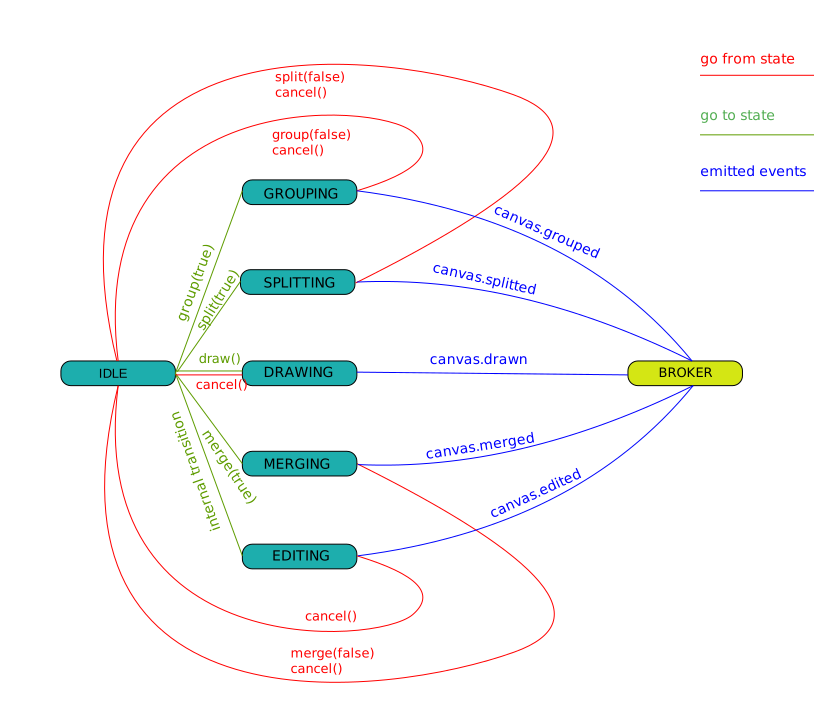
API Reaction
| FREE | GROUPING | SPLITTING | DRAWING | MERGING | EDITING | |
|---|---|---|---|---|---|---|
| html() | + | + | + | + | + | + |
| setup() | + | + | + | + | + | - |
| activate() | + | - | - | - | - | - |
| rotate() | + | + | + | + | + | + |
| focus() | + | + | + | + | + | + |
| fit() | + | + | + | + | + | + |
| grid() | + | + | + | + | + | + |
| draw() | + | - | - | - | - | - |
| split() | + | - | + | - | - | - |
| group | + | + | - | - | - | - |
| merge() | + | - | - | - | + | - |
| cancel() | - | + | + | + | + | + |