6.2 KiB
Basics
The center part of the library is the Dataset class, which allows to iterate
over its elements. DatasetItem, an element of a dataset, represents a single
dataset entry with annotations - an image, video sequence, audio track etc.
It can contain only annotated data or meta information, only annotations, or
all of this.
Basic library usage and data flow:
Extractors -> Dataset -> Converter
                 |
             Filtration
          Transformations
             Statistics
              Merging
             Inference
          Quality Checking
             Comparison
                ...
- Data is read (or produced) by one or many
Extractors and merged into aDataset - A dataset is processed in some way
- A dataset is saved with a
Converter
Datumaro has a number of dataset and annotation features:
- iteration over dataset elements
- filtering of datasets and annotations by a custom criteria
- working with subsets (e.g.
train,val,test) - computing of dataset statistics
- comparison and merging of datasets
- various annotation operations
from datumaro.components.project import Environment

# Import and save a dataset
env = Environment()
dataset = env.make_importer('voc')('src/dir').make_dataset()
env.converters.get('coco').convert(dataset, save_dir='dst/dir')
Library contents
Dataset Formats
Dataset reading is supported by Extractors and Importers:
- An
Extractorproduces a list ofDatasetItems corresponding to the dataset. - An
Importercreates a project from the data source location.
It is possible to add custom Extractors and Importers. To do this, you need
to put an Extractor and Importer implementations to a plugin directory.
Dataset writing is supported by Converters.
A Converter produces a dataset of a specific format from dataset items.
It is possible to add custom Converters. To do this, you need to put a
Converter implementation script to a plugin directory.
Dataset Conversions ("Transforms")
A Transform is a function for altering a dataset and producing a new one.
It can update dataset items, annotations, classes, and other properties.
A list of available transforms for dataset conversions can be extended by
adding a Transform implementation script into a plugin directory.
Model launchers
A list of available launchers for model execution can be extended by
adding a Launcher implementation script into a plugin directory.
Plugins
Datumaro comes with a number of built-in formats and other tools, but it also can be extended by plugins. Plugins are optional components, which dependencies are not installed by default. In Datumaro there are several types of plugins, which include:
extractor- produces dataset items from data sourceimporter- recognizes dataset type and creates projectconverter- exports dataset to a specific formattransformation- modifies dataset items or other propertieslauncher- executes models
A plugin is a regular Python module. It must be present in a plugin directory:
<project_dir>/.datumaro/pluginsfor project-specific plugins<datumaro_dir>/pluginsfor global plugins
A plugin can be used either via the Environment class instance,
or by regular module importing:
from datumaro.components.project import Environment, Project
from datumaro.plugins.yolo_format.converter import YoloConverter

# Import a dataset
dataset = Environment().make_importer('voc')(src_dir).make_dataset()

# Load an existing project, save the dataset in some project-specific format
project = Project.load('project/dir')
project.env.converters.get('custom_format').convert(dataset, save_dir=dst_dir)

# Save the dataset in some built-in format
Environment().converters.get('yolo').convert(dataset, save_dir=dst_dir)
YoloConverter.convert(dataset, save_dir=dst_dir)
Writing a plugin
A plugin is a Python module with any name, which exports some symbols. To export a symbol, inherit it from one of special classes:
from datumaro.components.extractor import Importer, SourceExtractor, Transform
from datumaro.components.launcher import Launcher
from datumaro.components.converter import Converter
The exports list of the module can be used to override default behaviour:
class MyComponent1: ...
class MyComponent2: ...
exports = [MyComponent2] # exports only MyComponent2
There is also an additional class to modify plugin appearance in command line:
from datumaro.components.cli_plugin import CliPlugin
Plugin example
datumaro/plugins/
- my_plugin1/file1.py
- my_plugin1/file2.py
- my_plugin2.py
my_plugin1/file2.py contents:
from datumaro.components.extractor import Transform, CliPlugin
from .file1 import something, useful

class MyTransform(Transform, CliPlugin):
    NAME = "custom_name" # could be generated automatically

    """
    Some description. The text will be displayed in the command line output.
    """

    @classmethod
    def build_cmdline_parser(cls, **kwargs):
        parser = super().build_cmdline_parser(**kwargs)
        parser.add_argument('-q', help="Very useful parameter")
        return parser

    def __init__(self, extractor, q):
        super().__init__(extractor)
        self.q = q

    def transform_item(self, item):
        return item
my_plugin2.py contents:
from datumaro.components.extractor import SourceExtractor

class MyFormat: ...
class MyFormatExtractor(SourceExtractor): ...

exports = [MyFormat] # explicit exports declaration
# MyFormatExtractor won't be exported
Command-line
Basically, the interface is divided on contexts and single commands. Contexts are semantically grouped commands, related to a single topic or target. Single commands are handy shorter alternatives for the most used commands and also special commands, which are hard to be put into any specific context. Docker is an example of similar approach.
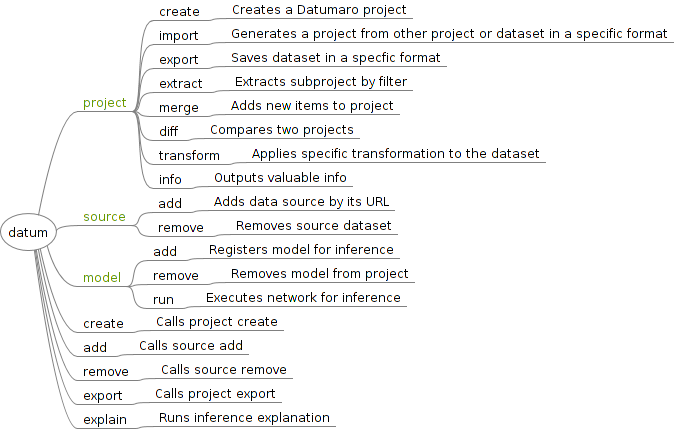
- The diagram above was created with FreeMind
Model-View-ViewModel (MVVM) UI pattern is used.