7.0 KiB
Datumaro
Table of contents
Concept
Datumaro is:
- a tool to build composite datasets and iterate over them
- a tool to create and maintain datasets
- Version control of annotations and images
- Publication (with removal of sensitive information)
- Editing
- Joining and splitting
- Exporting, format changing
- Image preprocessing
- a dataset storage
- a tool to debug datasets
- A network can be used to generate informative data subsets (e.g. with false-positives) to be analyzed further
Requirements
- User interfaces
- a library
- a console tool with visualization means
- Targets: single datasets, composite datasets, single images / videos
- Built-in support for well-known annotation formats and datasets: CVAT, COCO, PASCAL VOC, Cityscapes, ImageNet
- Extensibility with user-provided components
- Lightweightness - it should be easy to start working with Datumaro
- Minimal dependency on environment and configuration
- It should be easier to use Datumaro than writing own code for computation of statistics or dataset manipulations
Functionality and ideas
- Blur sensitive areas on dataset images
- Dataset annotation filters, relabelling etc.
- Dataset augmentation
- Calculation of statistics:
- Mean & std, custom stats
- "Edit" command to modify annotations
- Versioning (for images, annotations, subsets, sources etc., comparison)
- Documentation generation
- Provision of iterators for user code
- Dataset building (export in a specific format, indexation, statistics, documentation)
- Dataset exporting to other formats
- Dataset debugging (run inference, generate dataset slices, compute statistics)
- "Explainable AI" - highlight network attention areas (paper)
- Black-box approach
- Classification, Detection, Segmentation, Captioning
- White-box approach
- Black-box approach
Research topics
- exploration of network prediction uncertainty (aka Bayessian approach) Use case: explanation of network "quality", "stability", "certainty"
- adversarial attacks on networks
- dataset minification / reduction Use case: removal of redundant information to reach the same network quality with lesser training time
- dataset expansion and filtration of additions Use case: add only important data
- guidance for key frame selection for tracking (paper) Use case: more effective annotation, better predictions
Design
Command-line
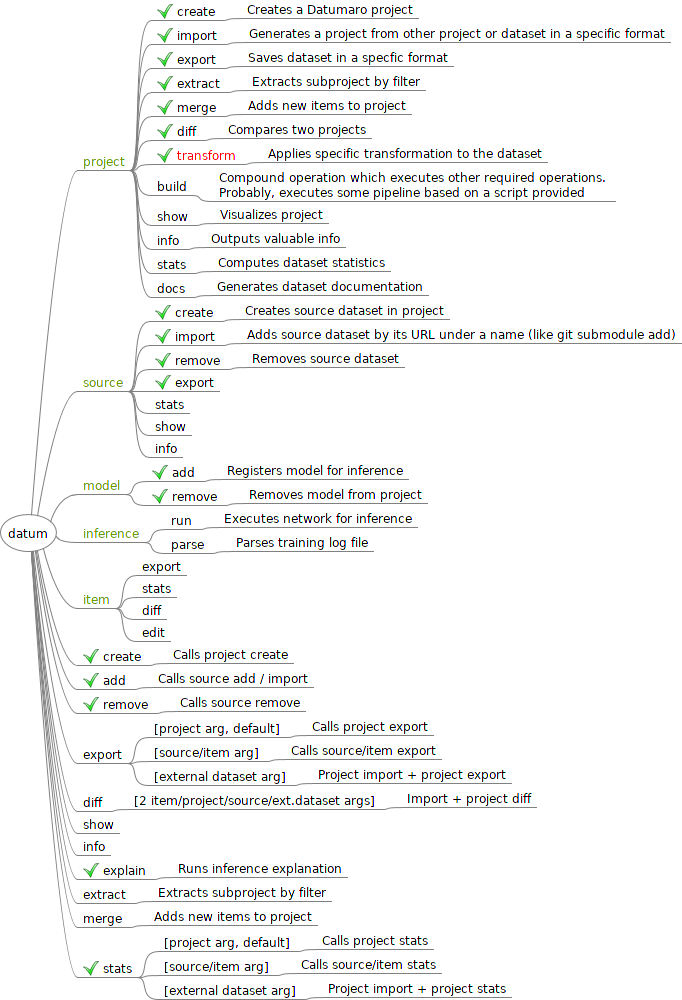
Use Docker as an example. Basically, the interface is partitioned on contexts and shortcuts. Contexts are semantically grouped commands, related to a single topic or target. Shortcuts are handy shorter alternatives for the most used commands and also special commands, which are hard to be put into specific context.
High-level architecture
- Using MVVM UI pattern

Datumaro project and environment structure
├── [datumaro module]
└── [project folder]
    ├── .datumaro/
    │   ├── config.yml
    │   ├── .git/
    │   ├── importers/
    │   │   ├── custom_format_importer1.py
    │   │   └── ...
    │   ├── statistics/
    │   │   ├── custom_statistic1.py
    │   │   └── ...
    │   ├── visualizers/
    │   │   ├── custom_visualizer1.py
    │   │   └── ...
    │   └── extractors/
    │       ├── custom_extractor1.py
    │       └── ...
    └── sources/
        ├── source1
        └── ...
RC 1 vision
In the first version Datumaro should be a project manager for CVAT. It should only consume data from CVAT. The collected dataset can be downloaded by user to be operated on with Datumaro CLI.
        User
          |
          v
 +------------------+
 |       CVAT       |
 +--------v---------+       +------------------+       +--------------+
 | Datumaro module  | ----> | Datumaro project | <---> | Datumaro CLI | <--- User
 +------------------+       +------------------+       +--------------+
Interfaces
- Python API for user code
- Installation as a package
- A command-line tool for dataset manipulations
Features
-
Dataset format support (reading, exporting)
- Own format
- COCO
- PASCAL VOC
- Cityscapes
- ImageNet
- CVAT
-
Dataset visualization (
show)- Ability to visualize a dataset
- with TensorBoard
- Ability to visualize a dataset
-
Calculation of statistics for datasets
- Pixel mean, std
- Object counts (detection scenario)
- Image-Class distribution (classification scenario)
- Pixel-Class distribution (segmentation scenario)
- Image clusters
- Custom statistics
-
Dataset building
- Composite dataset building
- Annotation remapping
- Subset splitting
- Dataset filtering (
extract) - Dataset merging (
merge) - Dataset item editing (
edit)
-
Dataset comparison (
diff)- Annotation-annotation comparison
- Annotation-inference comparison
- Annotation quality estimation (for CVAT)
- Provide a simple method to check annotation quality with a model and generate summary
-
Dataset and model debugging
- Inference explanation (
explain) - Black-box approach (RISE paper)
- Ability to run a model on a dataset and read the results
- Inference explanation (
-
CVAT-integration features
- Task export
- Datumaro project export
- Dataset export
- Original raw data (images, a video file) can be downloaded (exported)
together with annotations or just have links
on CVAT server (in the future support S3, etc)
- Be able to use local files instead of remote links
- Specify cache directory
- Be able to use local files instead of remote links
- Use case "annotate for model training"
- create a task
- annotate
- export the task
- convert to a training format
- train a DL model
- Use case "annotate and estimate quality"
- create a task
- annotate
- estimate quality of annotations
- Task export
Optional features
-
Dataset publishing
- Versioning (for annotations, subsets, sources, etc.)
- Blur sensitive areas on images
- Tracking of legal information
- Documentation generation
-
Dataset building
- Dataset minification / Extraction of the most representative subset
- Use case: generate low-precision calibration dataset
- Dataset minification / Extraction of the most representative subset
-
Dataset and model debugging
- Training visualization
- Inference explanation (
explain)- White-box approach
Properties
- Lightweightness
- Modularity
- Extensibility